
Your browser does not support the audio element.
bitnasdaq-logo
  • ···
  • Buy Crypto
  • ···
  • Futures
  • ···
  • Trade
  • ···
  • Market
  • ···
  • Mining
  • ···
  • Financial
  • ···
  • Spot & Margin
    • Spot
    • Margin
    • FAQs
  • Future
    • FAQs
    • User Guide
  • Financial
    • FAQs
    • User Guide
  • P2P
    • FAQs
    • User Guide
  • Convert
    • FAQs
    • User Guide
  • Security
    • FAQs
    • User Guide
  • Affiliate Program
    • FAQs
    • User Guide
  • General
    • User Guide
  • Reward Hub
    • User Guide
    • FAQs
  • Strategy Bot
    • FAQs
  • Referal Program
    • FAQs
  • VIP & My Fee
    • FAQs
  • BNQ Token
    • FAQs
    • User Guide
  • Copy Trade
  • BNQ Mining

Announcement

Help Center>P2P>User Guide>

Adding payment method to BNQ Global.

BNQ Global

Updated at: 2 years ago

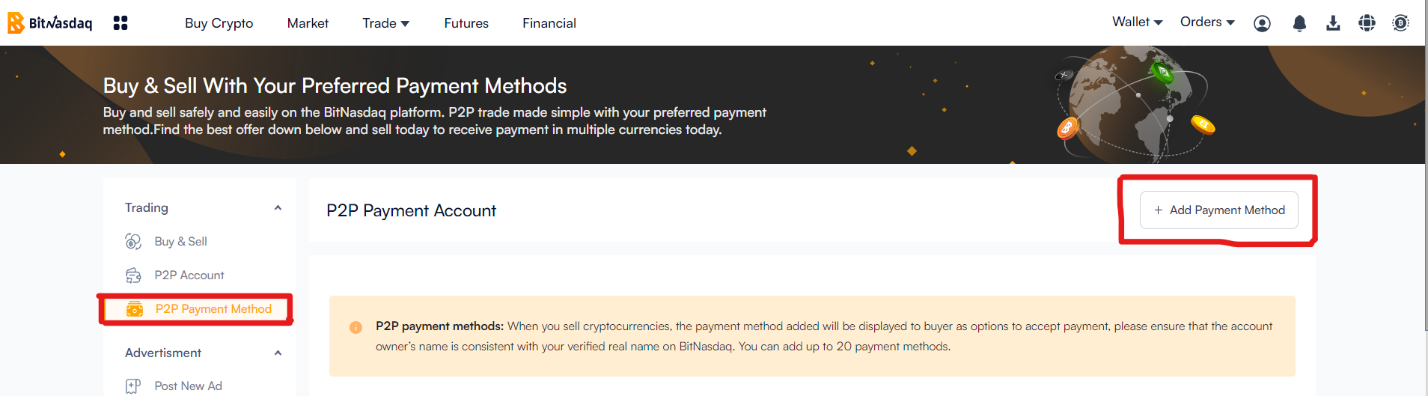
For completing P2P trades and transactions on BNQ Global, you need to add a fiat currency payment method. With BNQ Global it is important to note that the information and payment method are all secure on the exchange. Follow the step-by-step guide to adding a payment method to Your P2P account on the BNQ Global platform.
articleimages

  1. Login to your BNQ Global account.

  2. Access the P2P dashboard by clicking the Buy Crypto.

  3. Go to the P2P Payment Methods section.

  4. Choose Add Payment Method.

  5. Choose the payment method best suited for you.

  6. Fill in the payment method details.

  7. Verify and Confirm the payment method.

  8. Complete the verification process, if it is applicable to your selected payment method.

  9. Confirm the payment method.

  10. Start using the payment method.

And there you have it, with just a few simple steps you have added the payment method successfully to your BNQ Global account.

Related Articles

  • Setup Merchant Account Via App
  • How to complete the primary KYC process.
  • How to complete the advance KYC process.
  • What To Do If There Is A P2P Dispute
  • How To Submit A P2P Appeal On BNQ Global
  • Coin Has Not Been Released By The Seller, What To Do?
  • How To Submit A P2P Appeal On BNQ Global App
  • How To Get A Verified Merchant Certificate?
  • Adding payment method to BNQ Global.
  • How Can I Setup My P2P Trading Account?